The Pinefeat Canon EF/EF-S Lens Controller is an adapter that connects your dedicated astro camera to a Canon EF or EF-S lens and then provides ASCOM/INDI supported auto-focus capabilities. Let's look at how it performs for Astrophotography.
Introduction
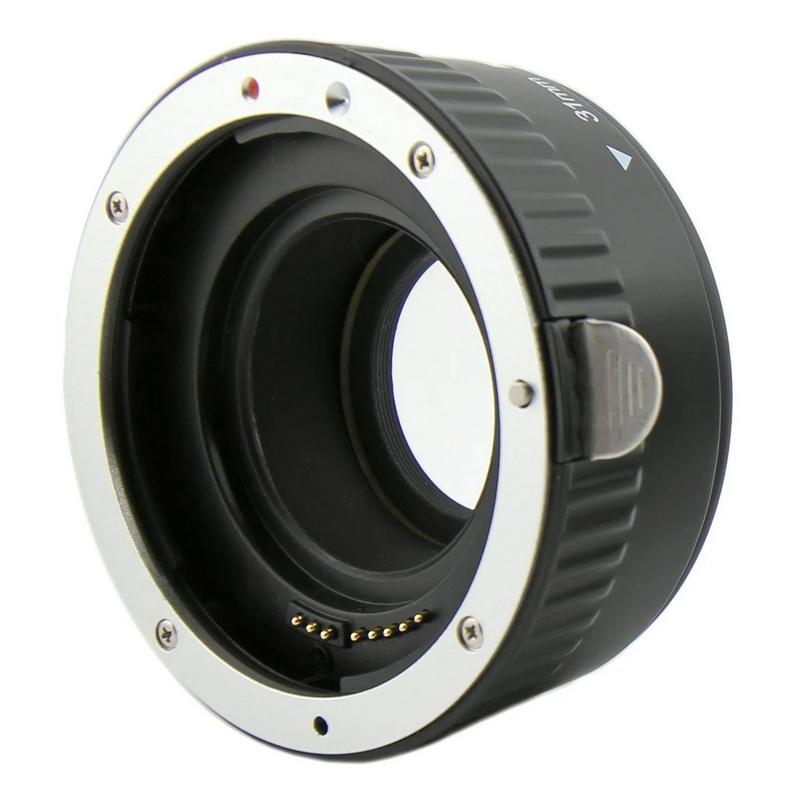 The Pinefeat web page describes this device simply:
The solution allows Canon EF and EF-S lenses to be used for astrophotography. In addition to mechanical mounting, it provides electronic control of lens focus and aperture via a USB port. Designed for compatibility with astronomical imaging software, the adapter enables users to control lens settings programmatically.
Aliaksandr from Pinefeat was kind enough to provide 17.5mm of back focus, which works with three different ZWO cameras that I have (ASI2600, ASI662, and ASI432). Let's take a closer look.
Key Specifications
- Brand & Model: Pinefeat EF / EF-S Lens Controller & Adapter
- Type: Camera / Lens mount with USB
- Price Range: About US$120-$130 (international purchase)
- Key Features:
- Canon EF/EF-S mount on one end
- T-mount on the other end
- USB port in the middle
- Best For: Astrophotography with a dedicated astro camera using an auto focus Canon camera lens
Design & Build Quality
- It's simple and comes in various versions with different back focus distances.
- ASCOM/INDI compatible focuser drivers provided
- Well-engineered, nice build, very well-made
- Looks an feels like an OEM part from Canon
Performance & Features
Okay, this may be hard to wrap your head around because it's so simple: this adapter has a T-mount on one end to screw your astro camera into and a Canon EF mount on the other end to attach a Canon EF or EF-S lens. In the middle is a micro-USB port that provides power and data. Once you have it connected, it shows up as an ASCOM or INDI focuser and your software can control the very accurate Canon auto-focus mechanics and aperture with insanely good precision. Gone are the days of mounting rings and gears and belts and external focusers to your Canon lens just to do AP without a massive rig. If you're lucky enough to own some good Canon (compatible) auto-focus lenses, then you're lucky enough to be able to use this without any extra bits stuck on. Honestly, the hardest part for me was figuring out how to put the resulting AP rig onto a tripod.
Own Canon lenses? Have a dedicated astro cam? Buy this.
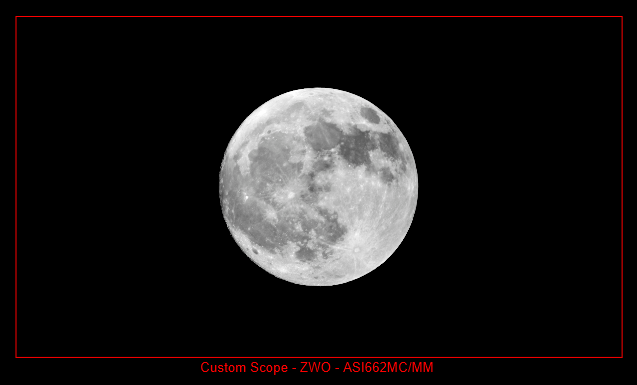 As you can see from this image, if you use an camera like the ZWO ASI662, and a nice but accessible 200mm/f4 lens, you'll get about 16% pixel coverage with a target like the Moon. Since the Moon and the Sun are about the same size, you'll need to use a barlow (I use a 2.5X PowerMate) to do solar work effectively. If you do, make sure you have a proper solar filter on the front of your lens. This is not the time for a Herschel wedge.
If you're lucky enough to have a Canon 100-400mm/4.5-5.6 lens like I do, then your coverage is more like 50% and the Moon will actually leak off the edge of your image. Time to switch to vertical mode and go for terminate pictures, if that's the case.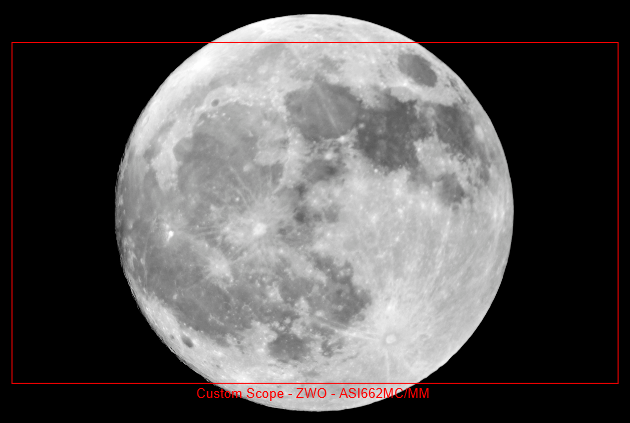 . My Canon lens collection is pretty large. In the EF line, I can go from 14mm through 400mm and have both 1.4x and 2x extenders I can add on top of that. In the EF-S world, I can get from 10mm through 250mm and while the extenders won't work, I think I have pretty much every millimeter of focal length covered. As I said, the hardest problem is mounting the thing.
Ease of Use
- It's true plug-and-play (with the drivers installed). There's simply nothing to "set" to "forget."
- SharpCap, NINA, and EKOS all found the focuser without any issues.
- Make sure you leave your lens focus selector in AF mode, not MF mode. Switching while connected may cause issues.
Pros & Cons
Pros
- Brain dead simple and easy to use
- Leveraging the built-in Canon auto-focus capabilities means using arguably the best photographic auto-focus system out there today
- The version I received has a screw-in filter holder inside so you can still use astro filters
- T-mount mounting provides flexibility for camera choice
Cons
- If the USB plug isn't where you need it to be, there's no provision for rotating the unit (see below)
- If you have the filter version, it can be hard to screw them in/out without dismantling your filter ring
- No mounting hardware or hole
General
- It's a UK company. While this isn't a "con" in the traditional sense, it may add expense and time for purchase and shipping.
- It's micro-USB instead of USB-C, but I'm told that this is being considered on future versions
Who Should Buy This?
- Ideal for anyone who has Canon compatible auto-focus lenses and wants to use them with a typical dedicated astro cam
- Best suited for wide-field astrophotography, time lapse, Moon and Milky Way shots
- Also makes a good solar scope if you have the proper filters
Final Verdict
Own Canon lenses? Have a dedicated astro cam? Buy this.
First, I have to give a huge thank you to Aliaksandr Smirnou, owner of Pinefeat LLP and the person behind this (and other) amazing pieces of kit. When he announced that they were available, I asked if I could do a demo and write up some thoughts, and here we are today. Me, writing up some thoughts. As mentioned, the version sent was the 17.5mm back focus version with filter ring adapter inside. PICTURE HERE. I did have to buy a few spacer rings to get the three cameras I was interested in using it with capable of getting the correct back focus. For the ASI2600, none needed; it just screws on because it already has 17.5mm back focus. For the ASI662 with its 12.5mm back focus, I needed a 5mm adapter. The ASI432 has a 6.5mm back focus but includes an 11mm ring to provide the correct 17.5mm. I took advantage of a sale at Agena Astro and bought an assortment of rings, adapters, and shims so I should be able to mount just about any camera on it.
Second, I really did have problems with what to do once the lens and camera were connected. There's no mounting hole, screws, adapter, bracket, or other piece of hardware on the EF lens adapter, so unless your Canon lens comes with a tripod foot of some sort, you end up with a tube with a camera at one end and Canon glass at the other. You might need telescope mounting rings after all. Luckily, Pinefeat includes engineering diagrams that include all of the measurements, so I whipped up a quick 3D printed ring/foot on my Bambu X1C printer that provided a simple friction fit for the adapter (with some 1mm felt lining for protection and friction), and a Bogen quick-release tab (and a threaded 1/4"x20 hole) on the bottom to put into a tripod. It's not pretty, but it's functional. In the meantime, my 70-200 and 100-400 lenses both have tripod feet, so my testing was primarily with those two lenses. They're likely to be my two main lenses used with this adapter anyway.
Third, it was a breeze to install the drivers, there's literally nothing that you can do wrong to connect the camera and lens, and then once connected to my control computer, both SharpCap and NINA had no problems connecting via ASCOM. Similarly, INDI drivers provided easy connections to my Astroberry-based Raspberry Pi. Everything "just worked" although I did have some issues with the MF/AF switch on my lens confusing things. I found that it's best to make sure that you're in AF mode before connecting anything and then making sure you stay in that mode. Otherwise the adapter could get confused. There is a self-test mode that requires you to switch the AF/MF back and forth a few times to activate. Once you're done playing with that, leave it in AF mode. In addition, if your lens has a focus limiter switch, best to leave it in the unlimited mode to allow the electronics to use the entire range of focus. Let's face it, you'll be near infinity most of the time anyway.
Also, I mentioned that there's no ability to rotate the unit in case you want to change the orientation of the USB port. I suggested that grub screws might be useful, and Aliaksandr told me that the back-plate can be unscrewed and rotated in 90 degree increments. But this is best left as a once or twice only solution, since repeatedly unscrewing and screwing the screws into the plastic might weaken the threads over time. It's a small thing with small benefits. Luckily, my 3D printed "ring" lets me turn the entire unit however I'd like. It just means that my camera cables and my adapter cable may not always align in the same direction.
Lastly, taking pictures was a breeze. It was just like having any other telescope with any other focuser installed. In fact, it's better, since the Canon AF electronics are super precise, and super fast. Plus the lens doesn't have to travel that far to change focus, so it's much faster than going through a few thousands steps in NINA with my Pegasus Astro Focus Cube.
In short, I have nothing bad to say except for the mounting. It would be bangers if there were some sort of removable, or rotating mounting ring for the unit, so that you can use it if you need to, and get it out of the way if your lens has a tripod foot on it. Getting the filter out was a little tricky once I screwed it in. I ended up using a micro-fiber cleaning cloth to get at it from both sides of the adapter and slowly unscrewed it between thumb and forefinger. At one point, the filter started unscrewing from the filter ring itself, but it's amazing to have the ability to put a filter in in the first place, so this is just a small pet peeve. Aliaksandr tells me that future plans are to change the back-plate from plastic to aluminum which will change tolerances a bit and make it easier to get the filter in/out.
Where to Buy
- Right now, only available from the producer, Pinefeat
Disclosure: This post may contain affiliate links, which help support our work at no extra cost to you.
FAQs
-
Q: Will it work with my non auto-focus lenses?
A: No. It uses the Canon electronics to focus the lens, though I suppose you could manually focus, but then...what's the point? -
Q: Is it good for traveling?
A: Absolutely! No longer do you need to pack a refractor, just pack your Canon lens! Assuming you want to do mainly wide-field, that is. -
Q: Can it set the aperture of the lens?
A: It does, but only to make it wide open. I don't believe it lets you stop it down (at least, not at this time).